- 072-3712551
- [email protected]
- א' - ה': 7:45 - 17:45
- ו' : 7:45 - 14:45

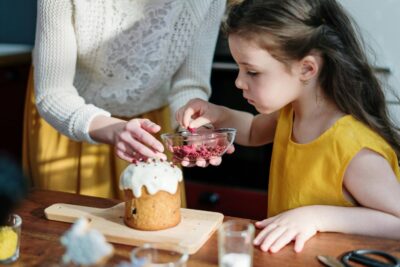
הסצנה המוכרת לכל הורה: אתם עומדים במטבח, מנסים לתקתק ארוחת ערב, והפעוט תלוי לכם על הרגליים בבכי “על הידיים”. הסקרנות הטבעית שלו מושכת אותו למעלה, אל השיש, למקום שבו הכל קורה. כאן נכנסים היתרונות של מגדל למידה – רהיט שמשנה את הדינמיקה הביתית מקצה לקצה. מדובר בהרבה יותר משרפרף; זהו כלי התפתחותי שמעניק לילד כרטיס כניסה לעולם המבוגרים בצורה הבטוחה ביותר.
היתרון המרכזי של המגדל טמון ביכולת שלו ליישם את עקרונות השיטה המונטסורית בתוך הבית. במקום שהילד ירגיש מתוסכל מול “עולם של גדולים”, המגדל מנגיש לו את הגובה ויוצר שינוי פסיכולוגי עמוק.
כשהילד מטפס בעצמו על המגדל, הוא לומד שהוא מסוגל. העצמאות הזו מחלחלת לכל תחומי החיים. הוא כבר לא תלוי בכם שתרימו אותו כדי לראות מה מתבשל בסיר; הוא מנהל את התנועה שלו במרחב באופן עצמאי.
אחד היתרונות של מגדל למידה הוא השקט הנפשי של ההורים. כשהילד עסוק בלצפות בכם או לעזור בערבוב הסלט, הצורך שלו בתשומת לב בלתי פוסקת יורד. הידיים שלכם מתפנות לעבודה, והילד רגוע כי הוא נמצא “במרכז העניינים”.
הורים רבים שואלים למה לא להשתמש פשוט בכיסא מטבח. התשובה פשוטה: בטיחות. המגדל תוכנן במיוחד כדי למנוע את תאונות הבית הנפוצות ביותר.
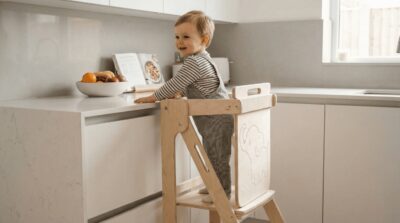
בניגוד לשרפרף פתוח, היתרונות של מגדל למידה באים לידי ביטוי במעקות המקיפים את הילד. במוצרים של בית מעץ, למשל, המבנה מתוכנן כך שהילד לא יכול ליפול לאחור או להחליק הצידה, גם אם הוא מאבד שיווי משקל לרגע.
מגדלי למידה איכותיים מיוצרים מעץ בירץ’ מלא וכבד מספיק כדי למנוע תנודות. הוספת מייצבים (“כנפיים”) בבסיס המגדל מבטיחה שגם אם הילד נשען בחוזקה על המעקה, המגדל לא יתהפך.
מעבר לעצמאות, המגדל הוא כלי לימודי מדרגה ראשונה. המטבח הופך לכיתת לימוד שבה הילד סופג ידע בלי להרגיש.
העברת קטניות, חיתוך ירקות רכים עם סכין בטיחותית או סחיטת לימון – כל אלו מפתחים את השרירים הקטנים בידיים. היתרונות של מגדל למידה כאן הם אדירים, שכן הילד מתנסה בפעולות אמיתיות שדורשות דיוק וריכוז.
ילדים שמשתתפים בהכנת האוכל נוטים לאכול אותו. כשהילד עומד על המגדל ורואה איך מכינים את הקציצות או הסלט, הוא נחשף לריחות, מרקמים וצבעים. החשיפה הזו מורידה את מפלס החרדה מאוכל חדש ומעודדת אותו לטעום מה שיצר במו ידיו.
כדי למקסם את היתרונות של מגדל למידה, עליכם לבחור את הדגם שמתאים לחלל המטבח שלכם ולמספר הילדים.
במטבחים מודרניים רבים אין מקום לרהיט נוסף קבוע. מגדל למידה מתקפל מעניק את כל יתרונות הבטיחות, אך בסיום השימוש הוא נעלם לתוך נישה דקה, מה ששומר על המטבח מאורגן ומרווח.
אם יש לכם שני קטנטנים בבית, מגדל למידה לתאומים הוא הפתרון. הוא מונע מריבות על “מי עומד ליד אמא” ומאפשר לשני האחים ללמוד יחד, לשתף פעולה ולפתח כישורים חברתיים תוך כדי משחק במטבח.
היתרונות של מגדל למידה נשמרים רק כשהמוצר איכותי ועמיד לאורך זמן. בבית מעץ אנחנו לא מתפשרים על פרטים הקטנים:
מגדל למידה דגם צליל עם עץ בירץ’ עם ציפוי פורמייקה: המטבח הוא מקום רטוב ומלכלך. הפורמייקה מאפשרת ניקוי מהיר במגבון ושומרת על המגדל חדש למשך שנים.
עבודת יד כחול-לבן: כל מגדל עובר בקרת איכות קפדנית, עם פינות מעוגלות וגימורים מושלמים לשמירה על בטיחות הילד.
לסיכום, היתרונות של מגדל למידה נוגעים בכל היבט של חיי המשפחה. הוא מעניק לילד ביטחון, עצמאות ומיומנויות לחיים, ומאפשר לכם, ההורים, לבשל בנחת ובשיתוף פעולה עם הקטנטנים. כשבוחרים במגדל איכותי ובטיחותי, משקיעים ברהיט שילווה אתכם שנים ויהפוך כל ארוחה לחוויה של למידה וחיבור.
מגדל למידה מתוכנן במיוחד למניעת נפילות ותאונות ביתיות. הוא כולל מעקות הגנה היקפיים של 360 מעלות, מרכז כובד נמוך ובסיס יציב (לעיתים עם מייצבים) המונעים מהילד להחליק, ליפול לאחור או להפוך את הרהיט.
המגדל מיישם את עקרונות השיטה המונטסורית ומנגיש לילד את גובה השיש. הוא מאפשר לו לטפס בעצמו, לנהל את התנועה שלו במרחב באופן עצמאי, ולצפות במעשי המבוגרים או לקחת בהם חלק פעיל.
כשילדים עומדים על המגדל ומשתתפים בהכנת המזון, הם נחשפים באופן טבעי לריחות, צבעים ומרקמים. החשיפה המוקדמת והמעורבות בהכנה מורידות את מפלס החרדה ממזונות חדשים ומעודדות אותם לטעום את מה שבישלו בעצמם.
עבור מטבחים קטנים מומלץ לבחור במגדל למידה מתקפל, שניתן לאחסן בנישה דקה בגמר השימוש. למשפחות עם שני קטנטנים מומלץ מגדל למידה לתאומים, המאפשר לשני אחים לעמוד יחד, מונע מריבות ומפתח כישורים חברתיים.
העבודה בגובה השיש מאפשרת לילד להתנסות בפעולות יומיומיות כמו העברת קטניות, סחיטת לימון וחיתוך ירקות רכים בסכין בטיחותית. פעולות אלו מחזקות את השרירים הקטנים בידיים ומפתחות מוטוריקה עדינה, קואורדינציה וריכוז.
מחסן עצים בית מעץ הצהרת נגישות
We firmly believe that the internet should be available and accessible to anyone, and are committed to providing a website that is accessible to the widest possible audience, regardless of circumstance and ability.
To fulfill this, we aim to adhere as strictly as possible to the World Wide Web Consortium’s (W3C) Web Content Accessibility Guidelines 2.1 (WCAG 2.1) at the AA level. These guidelines explain how to make web content accessible to people with a wide array of disabilities. Complying with those guidelines helps us ensure that the website is accessible to all people: blind people, people with motor impairments, visual impairment, cognitive disabilities, and more.
This website utilizes various technologies that are meant to make it as accessible as possible at all times. We utilize an accessibility interface that allows persons with specific disabilities to adjust the website’s UI (user interface) and design it to their personal needs.
Additionally, the website utilizes an AI-based application that runs in the background and optimizes its accessibility level constantly. This application remediates the website’s HTML, adapts Its functionality and behavior for screen-readers used by the blind users, and for keyboard functions used by individuals with motor impairments.
If you’ve found a malfunction or have ideas for improvement, we’ll be happy to hear from you. You can reach out to the website’s operators by using the following email
Our website implements the ARIA attributes (Accessible Rich Internet Applications) technique, alongside various different behavioral changes, to ensure blind users visiting with screen-readers are able to read, comprehend, and enjoy the website’s functions. As soon as a user with a screen-reader enters your site, they immediately receive a prompt to enter the Screen-Reader Profile so they can browse and operate your site effectively. Here’s how our website covers some of the most important screen-reader requirements, alongside console screenshots of code examples:
Screen-reader optimization: we run a background process that learns the website’s components from top to bottom, to ensure ongoing compliance even when updating the website. In this process, we provide screen-readers with meaningful data using the ARIA set of attributes. For example, we provide accurate form labels; descriptions for actionable icons (social media icons, search icons, cart icons, etc.); validation guidance for form inputs; element roles such as buttons, menus, modal dialogues (popups), and others. Additionally, the background process scans all of the website’s images and provides an accurate and meaningful image-object-recognition-based description as an ALT (alternate text) tag for images that are not described. It will also extract texts that are embedded within the image, using an OCR (optical character recognition) technology. To turn on screen-reader adjustments at any time, users need only to press the Alt+1 keyboard combination. Screen-reader users also get automatic announcements to turn the Screen-reader mode on as soon as they enter the website.
These adjustments are compatible with all popular screen readers, including JAWS and NVDA.
Keyboard navigation optimization: The background process also adjusts the website’s HTML, and adds various behaviors using JavaScript code to make the website operable by the keyboard. This includes the ability to navigate the website using the Tab and Shift+Tab keys, operate dropdowns with the arrow keys, close them with Esc, trigger buttons and links using the Enter key, navigate between radio and checkbox elements using the arrow keys, and fill them in with the Spacebar or Enter key.Additionally, keyboard users will find quick-navigation and content-skip menus, available at any time by clicking Alt+1, or as the first elements of the site while navigating with the keyboard. The background process also handles triggered popups by moving the keyboard focus towards them as soon as they appear, and not allow the focus drift outside of it.
Users can also use shortcuts such as “M” (menus), “H” (headings), “F” (forms), “B” (buttons), and “G” (graphics) to jump to specific elements.
We aim to support the widest array of browsers and assistive technologies as possible, so our users can choose the best fitting tools for them, with as few limitations as possible. Therefore, we have worked very hard to be able to support all major systems that comprise over 95% of the user market share including Google Chrome, Mozilla Firefox, Apple Safari, Opera and Microsoft Edge, JAWS and NVDA (screen readers), both for Windows and for MAC users.
Despite our very best efforts to allow anybody to adjust the website to their needs, there may still be pages or sections that are not fully accessible, are in the process of becoming accessible, or are lacking an adequate technological solution to make them accessible. Still, we are continually improving our accessibility, adding, updating and improving its options and features, and developing and adopting new technologies. All this is meant to reach the optimal level of accessibility, following technological advancements. For any assistance, please reach out to